By: Jadon Lee
February 20, 2026
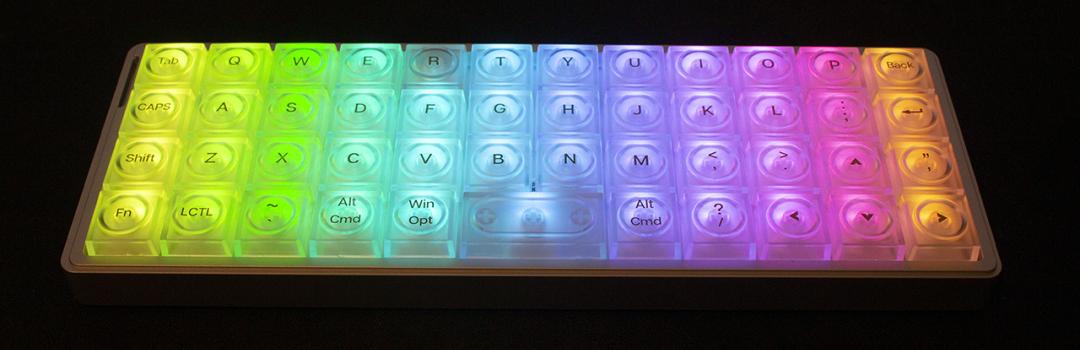
For those of you who do not know, Tuesday was Chinese New Year. Generally speaking, it is a time of family gatherings and red pockets. It is interesting to see how my niece and nephews behave during these family gatherings, as I find these kids seem to be such troublemakers. I found myself thinking about whether or not I got as wild as they did when I was a kid, only to come to the resounding answer of "no". I do think if these were the olden days -- I may be getting old to say something like this -- most of them would probably get spanked. Just to be clear, I think hitting children is bad, but I do think gentle parenting has a lot of issues as well. This leaves me wondering, what is the balance? If I become a parent, how will I raise them? I think each child is on a case-by-case basis, where they need to be cared for each in a specific way. Just like how kids deserve unique levels of care, people deserve their own unique keyboard. Today, we have the Epomaker Luma40, an ortholinear 40% keyboard. Will this unique keyboard pique my interest? Keep reading to find out!

Our review unit of the Epomaker Luma40 came alongside the RT82, TH108 Pro, and Split70 in a tightly wrapped in a plastic that covered many layers of bubble wrap underneath. The box was shipped to us here in Calgary, Alberta from Shenzhen, China via Yanwen. The shipping process was good, with no visible impact on the retail box. I was not worried about the condition of the product itself, as there was no noticeable damage.

The Epomaker Luma40’s box design is aesthetically pleasing, using a black and blue exterior. The front displays the Luma40 name on the bottom left. Epomaker’s logo is placed on the top left. We find a general render of the keyboard beside the logo with a few features listed below it. The back mentions some additional information. This is a straightforward design that offers very minimal, but relevant, information. Personally, I do not mind this, as I appreciate the lack of clutter and simplicity.
Before we continue, here are the specifications for the Epomaker Luma40, as specified by the manufacturer’s website:
Model: LUMA40
Layout: 40% Layout Keyboard, Ortholinear Keyboard
Number of Keys: 47 Keys
Battery: 1450mAh Rechargeable Battery
Battery Life: 7h with RGB on and 75h with RGB off
Connectivity: 2.4Ghz Wireless, Bluetooth and Cable Wired
Compatibility: Mac/WIN/Android
Keyboard Dimensions: 240*87*20.8mm
Case Material: CNC-Cut Aluminum
Plate Material: PC Plate
Flex-Cut: No Flex-Cut
Stabilizers: No Stabilizers
Mounting Structure: Tray Mount
Sound Dampening: Switch Pad and Bottom Sponge
Keycaps Profile: LAK Low-Profile
Keycap Material: Transparent PC Plastic
Mac Modifier Keycaps: Yes, the Luma40 Keyboard has keycaps for Mac system
Keycaps Manufacturing Technique: Silk-Screen Printed Legends
Hot-swappable: Yes, with Kailh low-profile mechanical switches
RGb Backlight: Yes, customizable dynamic RGB backlight, with north-facing per-key LEDs
Polling Rate: 1000Hz in 2.4G or wired and 125Hz in Bluetooth Mode
Latency: 3ms (USB), 5ms (2.4GHz Wireless). 15ms (Bluetooth)
Anti-Ghosting: Yes, with N-Key Rollover
Keyboard Weight: 410g
Front Height: 20.8mm
Typing Angle: Flat

Out of the box, you will receive the Epomaker Luma40 keyboard with a cable, keycap/switch puller, strap and all tools needed to install it, and a user manual. The keyboard is wrapped in plastic to prevent any surface scratches. I was satisfied when it came to packaging. The quality of the packaging is on par with many other manufacturers, as the foam protects the keyboards well.
Page Index
1. Introduction, Packaging, Specifications
2. A Closer Look - Hardware and Software
3. A Closer Look - Disassembly and Internals
4. Conclusion